
Preparing for a product photoshoot involves more than getting your products camera-ready. You need clear goals, a detailed shot list, approved styling, and a production plan that matches where you’ll use the final images and videos.
If you’re wondering how to prepare for a product photo shoot, start by identifying your intended platforms and deliverables. The same approach applies when deciding how to prepare for a product video shoot, with additional attention to movement, demonstrations, and video formats.
Whether you’re launching a new product in Dubai or refreshing your ecommerce catalog, this practical checklist will help you organize everything before shoot day.
Product Photography & Videography Shoot Preparation Checklist
Use this product photoshoot checklist to confirm the essentials before production begins.
- Define your goals: Identify the campaign, product launch, or business objective.
- List your channels: Confirm where you’ll use the content, from ecommerce listings to social media.
- Specify deliverables: Agree on the number of edited photos, videos, and variations.
- Create a photography shot list: Include hero images, alternate angles, close-ups, and lifestyle shots.
- Create a videography shot list: Plan demonstrations, product movements, and detail sequences.
- Prepare products and packaging: Clean surfaces, inspect labels, and check accessories.
- Organize product variants: Identify every required SKU, color, size, or finish.
- Approve the creative direction: Share your mood board, references, and brand guidelines.
- Confirm props and backgrounds: Identify who will source each item.
- Arrange talent if needed: Book models, hand models, or styling support.
- Confirm aspect ratios: Specify square, portrait, vertical, or landscape formats.
- Plan logistics: Arrange transportation, studio access, and product handling.
- Assign a decision-maker: Choose someone who can approve creative decisions on-site.
- Agree on post-production: Confirm editing, revisions, approvals, and delivery dates.
Keep this checklist alongside your product inventory and shot lists so the production team can track every requirement.
1. Define the Goal, Channels and Deliverables
Start your product photography preparation by deciding what the content needs to achieve.
A skincare launch might require clean ecommerce photographs, lifestyle images, and short promotional videos. An established retailer updating its catalog may only need consistent product images.
Your business goal determines which assets to prioritize.
Decide Where the Content Will Be Used
Decide Where the Content Will Be Used
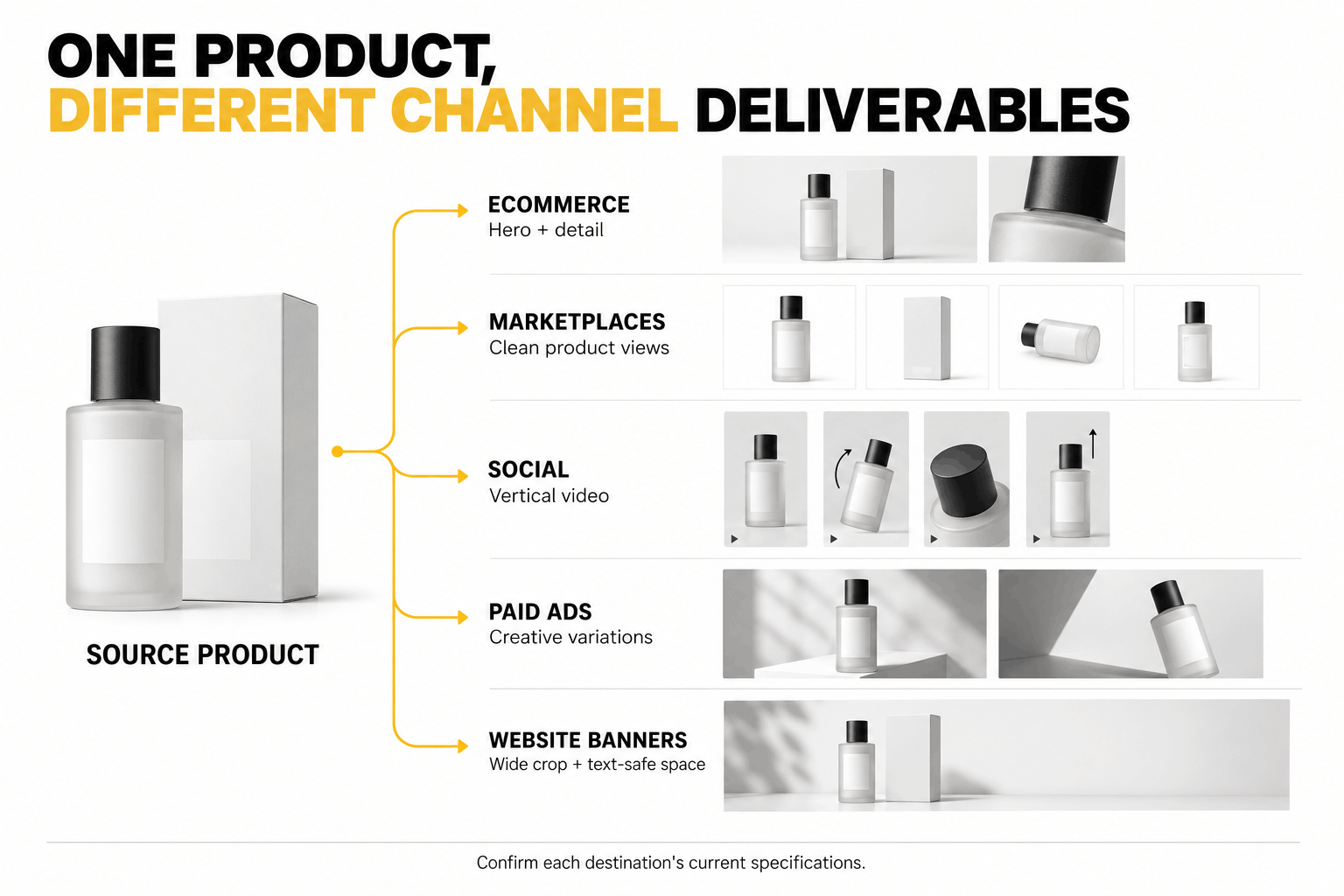
List every platform before planning compositions or camera setups. Different channels often require different image styles, dimensions, and video formats.
| Channel | Recommended Content |
|---|---|
| Ecommerce website | Hero images, alternate angles, close-ups, and demonstrations |
| Amazon and Noon | Marketplace-compliant images and supporting product views |
| Instagram and TikTok | Vertical product videos, lifestyle content, and short promotional clips |
| Paid advertising | Campaign images, videos, and placement-specific variations |
| Website banners | Wide images or videos with space for text |
Check each platform’s current technical requirements. For example, Google Merchant Center’s image guidelines distinguish primary product images from additional and lifestyle images and restrict promotional overlays on primary images.
A styled lifestyle photograph might work for your website but may not suit a marketplace’s main product image requirements.
If you’re planning content for multiple channels, discuss the required formats with a team offering professional photography and videography services in Dubai before finalizing your shot list.
Confirm the Required Photos and Videos
Define exactly what you’ll receive after production rather than requesting “some photos and videos.”
For example, a Dubai skincare brand launching three products might request:
- Three hero images, one for each product.
- Front, back, and detail photographs for product pages.
- Three lifestyle photographs featuring the collection.
- One product demonstration video.
- Three short vertical promotional videos.
This is an illustrative example, not a fixed production package.
Confirm how many finished assets the team will deliver, their intended uses, and whether the agreement includes editing and format variations.
Remember that capturing several video clips doesn’t automatically mean receiving several individually edited videos.
2. Build Your Photography and Videography Shot Lists
A shot list identifies what the production team must capture, including camera angles, product details, movements, and intended uses.
Prepare separate photography and videography lists, then coordinate them around shared products, backgrounds, and lighting setups.
Product Photography Shot List
Your product photography shot list should cover the details customers need to examine and the creative images you’ll use for marketing.
| Shot Type | What to Capture |
|---|---|
| Hero image | Clear front or three-quarter product view |
| Alternate angles | Side, rear, top, or other relevant views |
| Detail shot | Texture, labels, materials, or distinctive features |
| Scale shot | Product beside a reference object or in someone’s hand |
| Lifestyle shot | Product in a relevant real-world setting |
| Packaging shot | Box, container, or included accessories |
| Group shot | Product collections or approved bundles |
Not every product needs every shot type.
A jewelry brand may prioritize gemstone details and clasp mechanisms, while a furniture brand may need wider lifestyle photographs that communicate scale.
Practical tip: Associate each required shot with its SKU. This helps you identify missing product variants during production and file review.
Product Videography Shot List
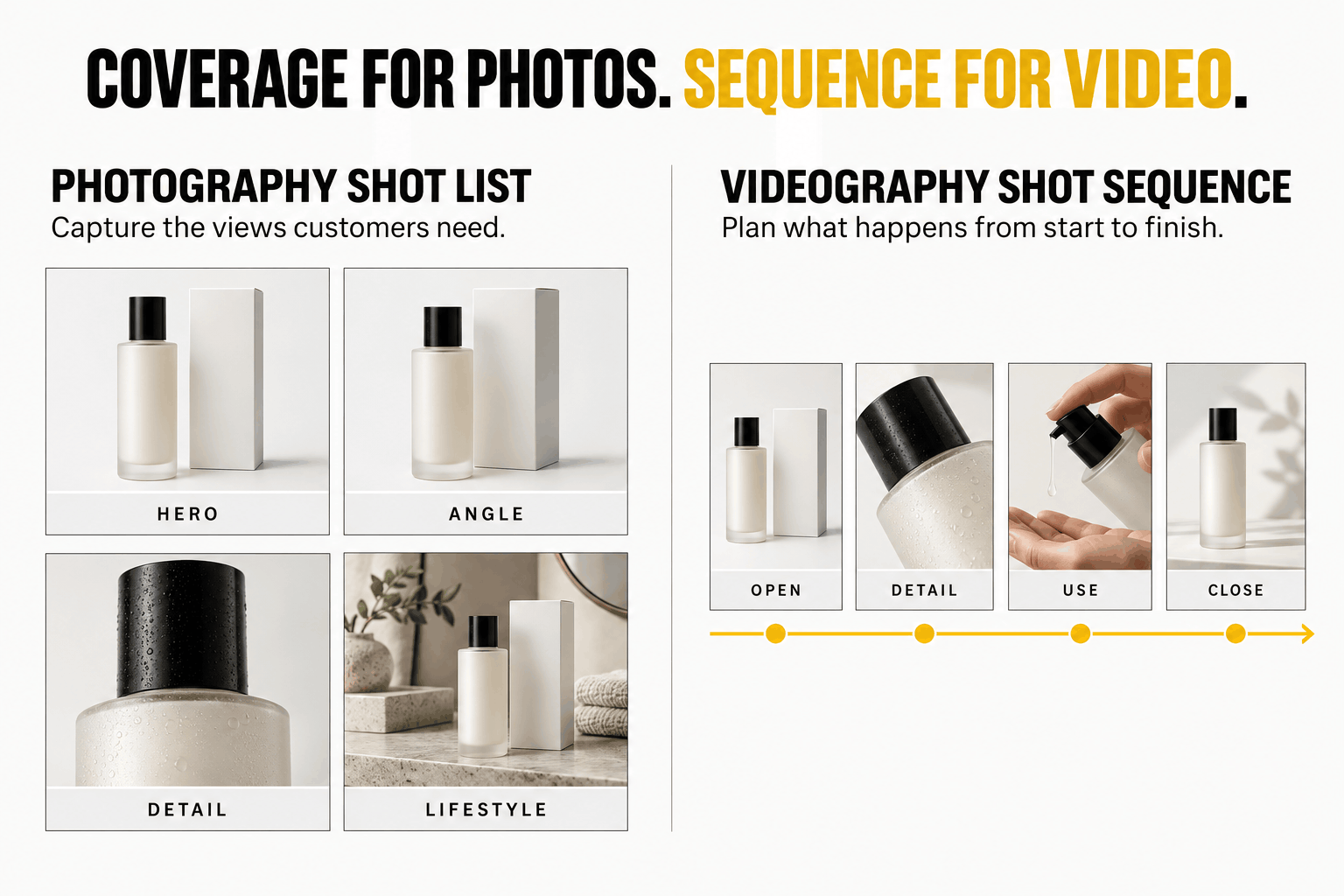
A product videography shot list describes what happens within each video sequence. Include movement, product interactions, and any demonstrations.
For a cosmetic product, the sequence might include:
- Opening shot: Introduce the product with a clear composition.
- Detail shot: Highlight packaging, texture, or important features.
- Interaction shot: Show someone opening, applying, or using the product.
- Closing shot: Return to the product with space for optional branding or a call to action.
A demonstration video for an ecommerce page may require more functional detail than a short social media advertisement.
Specify whether each shot needs hands, models, sound, dialogue, or particular movements.
Prioritize Must-Have vs Nice-to-Have Shots
Separate your shot list into two priorities.
Must-have shots fulfill essential deliverables, such as the main image for every SKU or an agreed product demonstration.
Nice-to-have shots add creative variety, such as alternative lighting styles or additional camera movements.
Capture must-have content first. If styling changes or lighting adjustments take longer than expected, you can reduce optional shots without compromising essential deliverables.
3. Prepare Your Products and Variants
Prepare every product before sending it to the studio. Clean, complete products with accurate packaging reduce interruptions and help the team capture images that represent what customers will receive.
Check Packaging, Labels and Accessories
Inspect products for scratches, fingerprints, dust, damaged packaging, and missing accessories.
Preparation varies by product category:
- Skincare and cosmetics: Clean bottles, check caps, and confirm labels.
- Fashion: Steam garments where appropriate, remove lint, and inspect stitching.
- Jewelry: Clean surfaces and check clasps or fastenings.
- Electronics: Remove dust, charge devices, and prepare demonstration accessories.
- Food and beverages: Check packaging, freshness, and storage requirements.
Use final approved packaging whenever possible. If you’re photographing retail-ready products, outdated prototypes can misrepresent the items customers will purchase.
Prepare spare samples for fragile products or demonstrations that consume or damage the item.
Organize Product Variants
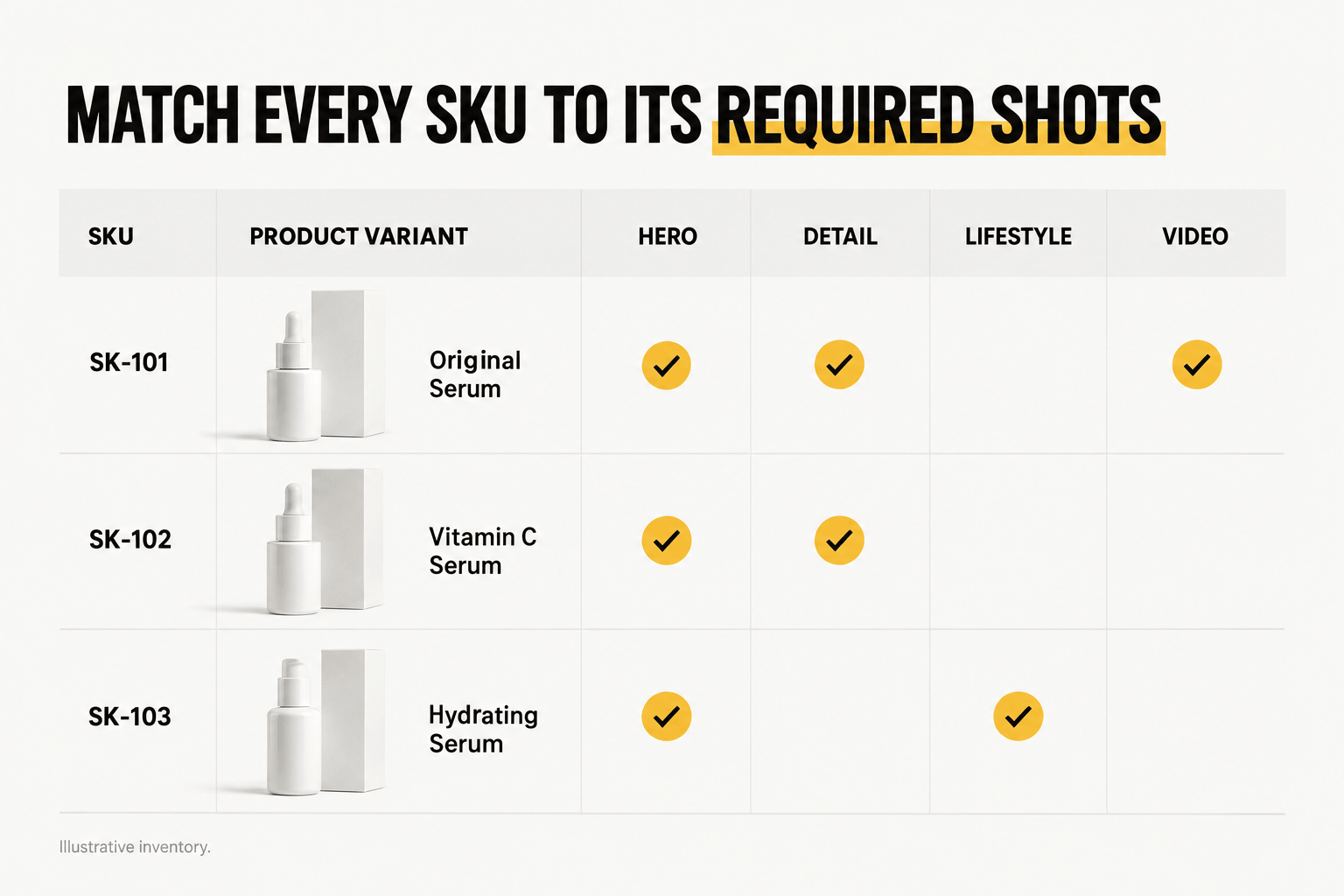
List every SKU, color, size, fragrance, or finish that requires photography or video coverage.
A simple inventory might look like this:
| SKU | Product Variant | Required Shots |
|---|---|---|
| SK-101 | Original Serum | Hero, detail, video |
| SK-102 | Vitamin C Serum | Hero, detail |
| SK-103 | Hydrating Serum | Hero, lifestyle |
Illustrative inventory.
Confirm which variants need their own hero images and which can share supporting content. Each product image should accurately represent the corresponding item.
Label transport boxes by SKU, but remove temporary labels from visible product surfaces before shooting.
Prepare Reflective or Transparent Products
Glass bottles, polished metal, jewelry, and glossy packaging often need specialized lighting arrangements.
Reflections may reveal equipment or unwanted surroundings, while transparent materials can lose definition against certain backgrounds.
Before the shoot, clean these products carefully and share reference images showing your preferred appearance.
For example, a perfume bottle may require controlled reflections that preserve the glass’s transparency while keeping its label readable.
Discuss these challenges with the photographer early so the team can prepare suitable lighting, diffusers, and reflectors.
4. Lock the Creative Direction, Styling and Props
Approve your visual direction before shoot day. The creative brief should explain the intended appearance, brand identity, and overall mood of the photographs and videos.
Create a Mood Board and References
A mood board communicates your preferred lighting, compositions, colors, backgrounds, and styling.
For example, a skincare brand might choose soft lighting and neutral surfaces, while a luxury watch brand might prefer darker backgrounds and controlled highlights.
Share references for:
- Visual style and lighting.
- Background colors and surface materials.
- Product positioning and camera angles.
- Brand colors, logos, and packaging presentation.
- Video pacing, movement, and overall mood.
Avoid vague instructions such as “make it look premium.” Explain which elements create the desired appearance.
Include your brand guidelines to help the team maintain consistency across the final assets.
Choose Backgrounds, Props and Supporting Elements
Select props that complement the product and support the intended message.
A skincare shoot might use neutral towels or textured surfaces. A home decor shoot may need furniture or an interior setting to demonstrate the product’s intended use.
Keep catalog photography simple when customers need a clear view of the product.
For lifestyle scenes, identify every required prop and confirm whether the studio or your team will provide it.
If your creative direction requires models or hands, arrange casting, wardrobe, grooming, scheduling, and relevant usage permissions before production.
5. Confirm the Shoot Plan, Logistics and Approval Process
A production plan keeps products, people, equipment, and creative decisions coordinated.
Confirm the location, schedule, transportation, and responsibilities before arriving at the shoot.
Studio vs On-Location Requirements
Choose a location that supports your visual requirements.
Studio photography offers greater control over lighting, backgrounds, and repeatable product setups. It often suits ecommerce catalog images, packaging photography, and controlled demonstrations.
On-location photography uses real environments to show products in context. Furniture, hospitality products, and certain lifestyle campaigns may benefit from this approach.
For shoots in Dubai, confirm venue access, necessary permissions, equipment requirements, and any restrictions before production.
Also plan transportation and storage, particularly for fragile, oversized, or temperature-sensitive products.
Assign a Decision-Maker
Choose one representative who can approve styling, product presentation, and other creative decisions during the shoot.
This person should understand the brief and have authority to resolve questions about product placement, brand requirements, and shot priorities.
The production team can manage technical execution while your representative checks that the visuals meet business and brand expectations.
For larger shoots, establish a backup contact and identify which changes require additional approval.
Plan Photography and Videography Together
Combining photography and videography can reduce repeated product preparation when both use the same products and settings.
However, video may require additional camera movements, demonstrations, sound recording, and lighting adjustments.
For example, a combined skincare shoot could follow this workflow:
- Prepare the product and lighting.
- Capture catalog and detail photographs.
- Complete approved lifestyle compositions.
- Adjust the setup for video.
- Record product movements and demonstrations.
- Review the footage before changing products.
The ideal order depends on your setup. Grouping shots by background or lighting arrangement may save more time than completing each SKU individually.
What Happens on Shoot Day?
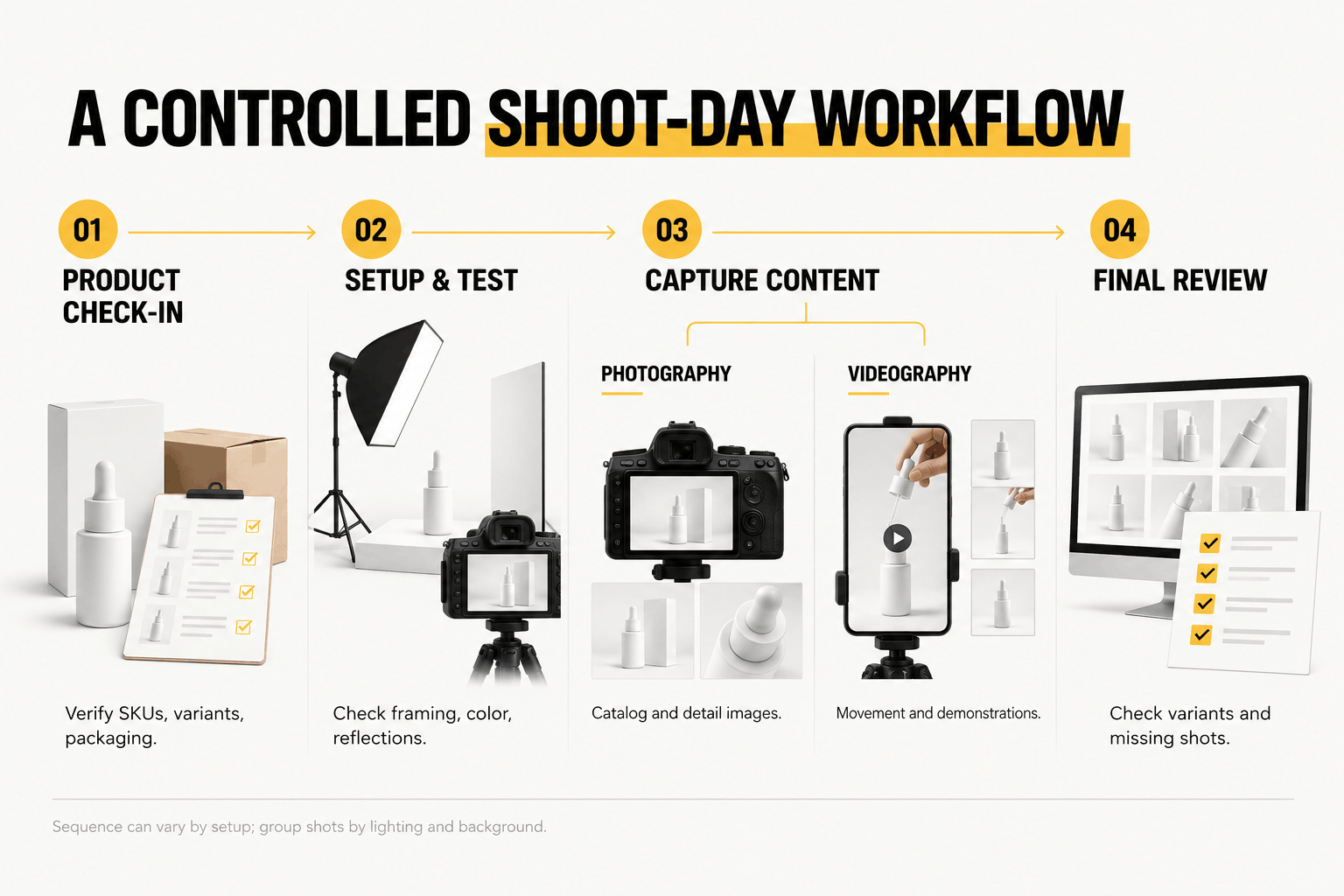
Most product shoots follow a straightforward production sequence:
- Product check-in: Verify SKUs, variants, packaging, and accessories.
- Setup: Arrange lighting, cameras, backgrounds, and props.
- Test shots: Review framing, product colors, reflections, and label visibility.
- Production: Capture the approved photo and video shot lists.
- Final review: Check for missing or incorrect shots before dismantling the setup.
Pay attention to product accuracy during preview checks. Confirm that the team has captured the correct variant, that labels remain readable, and that video demonstrations show the intended product behavior.
An on-set review cannot replace final editing, but it can reveal problems that would otherwise require a reshoot.
6. Confirm Post-Production and Delivery Requirements
Agree on post-production expectations before the shoot.
Clarify which services the production team will provide, including photo retouching, color correction, video editing, captions, music, and format variations.
Confirm these details:
- Final assets: Number of edited photos and videos.
- Retouching: Background cleanup, dust removal, and color adjustments.
- Video editing: Duration, sequence, captions, and sound requirements.
- Formats: File types, resolution, and aspect ratios.
- Approvals: Review stages, decision-maker, and included revision rounds.
- Delivery: Final deadline, file organization, and usage rights.
Common aspect ratios include 1:1 for square images, 4:5 for portrait content, 9:16 for vertical videos, and 16:9 for widescreen content. These are planning formats, not universal specifications for every platform.
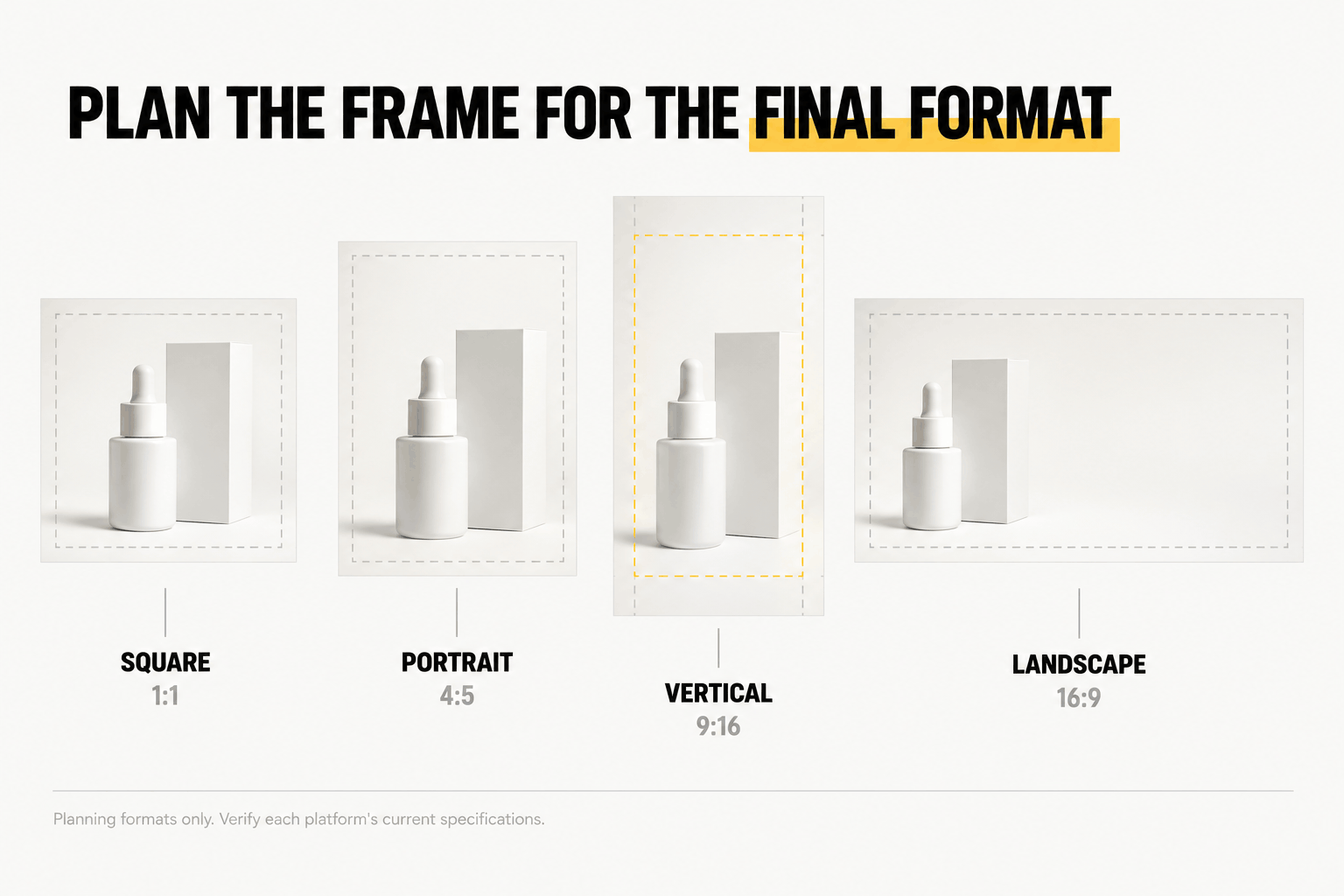
Confirm exact requirements for each destination. A vertical video may need different framing from a landscape version, especially when hands, labels, or product movements occupy the edges.
For easier asset management, request descriptive filenames such as SK-101_Hero_Front_1x1.jpg.
Organizing approved files by SKU and content type will also simplify future ecommerce updates and campaign production.
Final Pre-Shoot Check
Before shoot day, compare your product inventory, shot lists, and deliverables.
Every required product variant should have an assigned shot, and every final deliverable should correspond to content the production team plans to capture.
Make one final check that:
- The team has approved the creative brief and visual references.
- All products, packaging, and accessories are ready.
- The location, schedule, props, and talent are confirmed.
- Your decision-maker understands the approval process.
- Everyone agrees on editing, revisions, and delivery expectations.
Resolve any missing essential items before production starts. This final review helps prevent avoidable delays and incomplete coverage.
Frequently Asked Questions
Should product photography and videography be done during the same shoot?
Yes, combining photography and videography can be efficient when both require the same products, location, and creative direction. However, video may need additional equipment, lighting adjustments, and demonstrations. Confirm the production schedule and deliverables before combining both services.
How many product samples should I prepare?
Prepare at least one shoot-ready sample for each required product variant. Bring extras for fragile products or demonstrations involving opening, applying, or consuming the item. Confirm the quantities with your production team based on the shot list.
Do I need models, props or a stylist?
Not necessarily. Clean ecommerce photography often requires only the product, a suitable background, and lighting. Lifestyle images or demonstrations may benefit from models, props, or professional styling. Let your creative direction and shot list determine what you need.
What should I send the production team before shoot day?
Send the approved creative brief, product inventory, shot lists, mood board, brand guidelines, and deliverable specifications. Include product handling instructions, location details, platform requirements, and the contact information of your authorized decision-maker.
Ready to Plan Your Product Photography & Videography Shoot?
A clear brief, organized products, and the right production plan make it easier to create visual assets for ecommerce, advertising, websites, and social media.
Explore The Creatives 360‘s professional photography and videography services in Dubai for your next product content shoot.