
You can publish great content, target the right keywords, and still struggle to appear in Google Search. Sometimes, the problem has nothing to do with what you’ve written. Search engines may simply be unable to crawl, render, or index your pages properly.
That’s where technical SEO comes in.
Technical SEO helps search engines access and understand your website. It covers everything from robots.txt and XML sitemaps to site architecture, Core Web Vitals, and JavaScript rendering.
This guide explains what technical SEO involves, Google’s minimum requirements, and a practical 15-point technical SEO checklist you can use to find problems and decide what to fix first.
What Is Technical SEO?
Technical SEO is the process of improving a website’s technical setup so search engines can discover, crawl, render, and index its content correctly.
Say you’ve published a service page, but it isn’t showing up in Google. The content looks fine, your keywords are relevant, and the page loads normally in your browser.
Then you check Google Search Console and discover an accidental noindex tag.
Removing that tag fixes the indexing restriction, although Google still decides whether the page should appear in its index.
Technical SEO deals with problems like this. It works alongside two other areas of search engine optimization:
- On-page SEO focuses on content relevance, keywords, titles, headings, and other improvements made directly to a webpage.
- Off-page SEO covers external signals such as backlinks, brand mentions, and digital PR.
These areas sometimes overlap. Internal linking, for instance, supports both website architecture and on-page SEO.
What Does Technical SEO Include?
Technical SEO covers the systems that allow search engines and visitors to access and use your website.
The amount of work depends on the site. A small business website might only need straightforward indexing, security, and performance checks. An ecommerce store with thousands of product URLs may also need careful management of filters, pagination, duplicate pages, and crawl budget.
What Are the 4 Main Components of Technical SEO?
For a practical website audit, you can group technical SEO into four areas:
| Component | Purpose | Common Elements |
|---|---|---|
| Crawling and discovery | Help search engines find important pages | Robots.txt, XML sitemaps, internal links |
| Rendering and indexing | Make content accessible and control indexing | JavaScript rendering, HTTP status codes, noindex, canonical tags |
| Website structure | Organize pages and their relationships | URL hierarchy, pagination, hreflang |
| Performance and experience | Improve how people access and use the site | Core Web Vitals, mobile usability, HTTPS |
Structured data also helps search engines interpret page information and may support eligibility for certain search features.
These components provide a useful audit framework rather than an official classification from Google.
What Are the Most Important Technical SEO Factors?
The most important technical SEO factors are those that affect whether search engines can access your content, understand its purpose, and select the appropriate URLs for search results.
Some problems can prevent important pages from being indexed. Others affect website usability, discovery, or eligibility for additional search features.
Here are the main factors worth checking:
| Technical SEO Factor | What to Check |
|---|---|
| Crawlability | Can Googlebot access your important pages? |
| Indexability | Are any priority pages blocked by unintended noindex directives? |
| Canonicalization | Do duplicate URLs point to the preferred version? |
| Site architecture | Can visitors and crawlers reach important pages through internal links? |
| Page performance | Are loading speed, responsiveness, and visual stability acceptable? |
| Mobile usability | Is important content accessible and usable on mobile devices? |
| Structured data | Does your markup accurately describe the page and meet the relevant requirements? |
The impact varies by issue.
A blocked service page can lose its opportunity to appear in search results altogether. An invalid structured data property may only affect eligibility for a particular rich result.
The distinction matters when deciding which problems deserve immediate attention.
What Are Google’s Technical SEO Requirements?
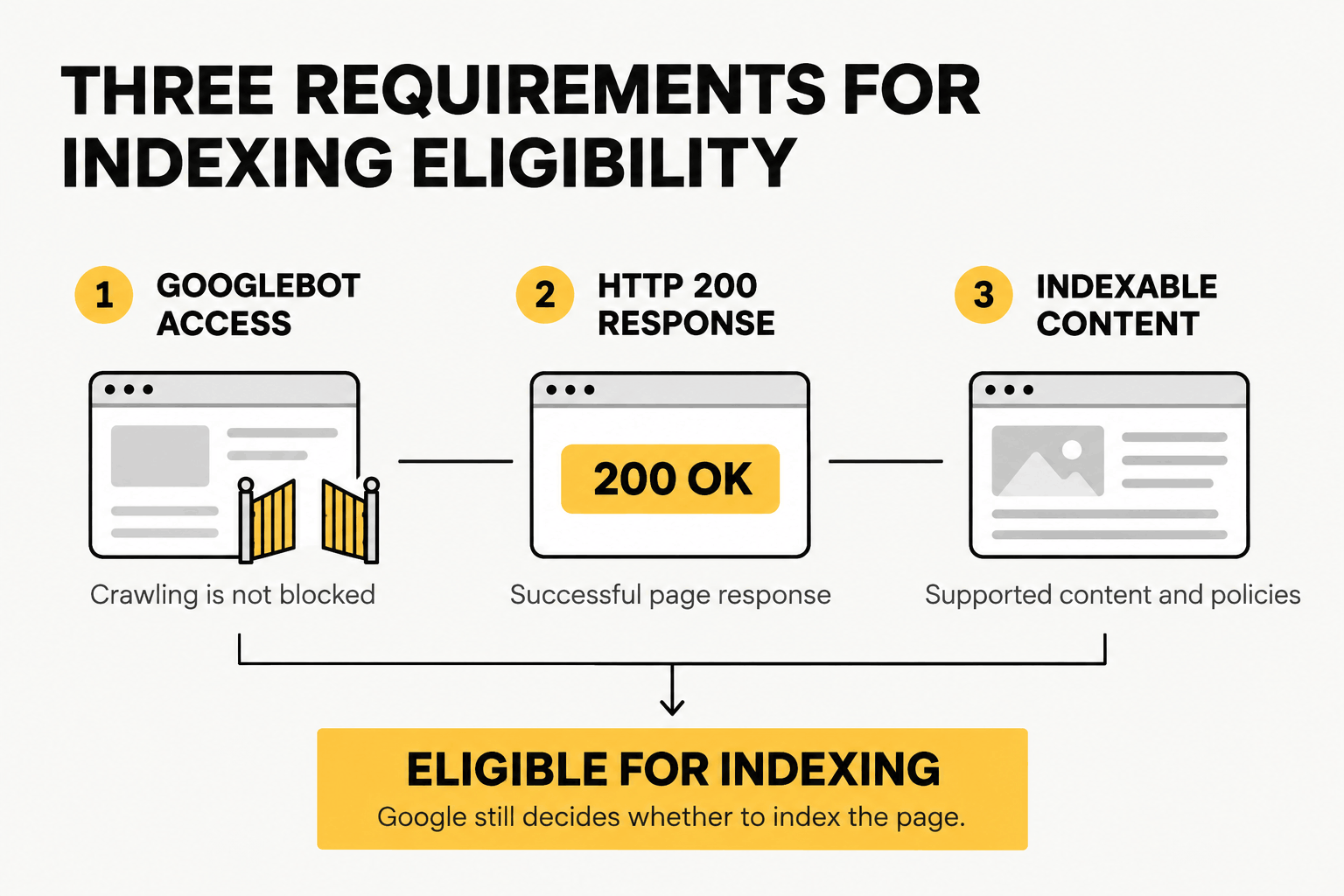
According to Google Search Central’s technical requirements, a webpage needs to meet three minimum conditions to be eligible for indexing:
- Googlebot must be able to access the page. Crawling cannot be blocked.
- The page must return HTTP 200. Google needs to receive a successful response rather than an error.
- The page must contain indexable content. The content must use a supported format and comply with applicable Search policies.
Meeting these requirements makes a page eligible for indexing. It doesn’t guarantee that Google will index or rank it.
Technical Requirements vs. SEO Best Practices
The minimum requirements establish whether Google can index a page. Technical SEO best practices address a wider range of concerns, including duplicate URLs, internal linking, website performance, and usability.
During an audit, start with problems that prevent important pages from being crawled or indexed. Once those are resolved, move on to site structure, page speed, and other improvements.
| Category | Examples | Purpose |
|---|---|---|
| Minimum requirements | Googlebot access, HTTP 200, indexable content | Establish eligibility for indexing |
| Crawling and indexing best practices | XML sitemaps, canonical tags, internal linking | Improve discovery and URL management |
| Performance recommendations | Core Web Vitals, mobile usability, HTTPS | Improve page experience |
| Search appearance enhancements | Supported structured data | Help eligible content appear with additional search features |
If you’re unsure what’s holding your website back, The Creatives 360’s SEO services in Dubai include technical audits to identify crawling, indexing, and performance issues worth fixing first.
The 15-Point Technical SEO Checklist
Use this technical SEO checklist to examine your website one area at a time.
You don’t need to fix every warning you find. Focus on problems affecting important pages, then work through the remaining issues based on their impact.
1. Check Crawlability and Robots.txt
Your robots.txt file tells search engine crawlers which URL paths they can request.
One incorrect rule can block a significant part of your website. For example:
User-agent: *
Disallow: /
This rule blocks compliant crawlers from accessing the entire site.
To check your setup, open yourdomain.com/robots.txt and review the rules. Then use Google Search Console’s URL Inspection tool to investigate important pages.
Make sure Googlebot can access your priority URLs and the CSS and JavaScript files needed to render them.
You may also want to restrict unnecessary crawling of administrative paths, internal search results, or duplicate parameter URLs, depending on how the website works.
One important detail: robots.txt controls crawling, not indexing.
If you want to prevent a publicly accessible page from appearing in Google’s index, use a noindex directive that Googlebot can crawl and detect. Private administrative areas should be protected through authentication rather than robots.txt alone.
2. Verify Indexability and HTTP Status Codes
A page can be crawlable without being eligible for indexing.
Open the Page Indexing report in Google Search Console and look for unexpected exclusions. Pay particular attention to service pages, product pages, categories, and other URLs that matter to your business.
Common problems include:
- Accidental
noindexdirectives - Access restrictions
- Server errors
- Soft 404 pages
- Incorrect HTTP status codes
Pages intended for indexing should generally return 200 OK.
A deleted page, however, may correctly return 404 Not Found or 410 Gone. Those responses aren’t automatically errors that need fixing.
If a revenue-generating landing page is unintentionally excluded from indexing, investigate that before spending time on minor technical warnings.
3. Audit XML Sitemaps
An XML sitemap helps search engines discover the URLs you want them to find.
Check your sitemap in Google Search Console and compare it against the actual website.
It should generally contain:
- Live URLs returning HTTP 200
- Pages intended for indexing
- Preferred canonical URLs
- Accurate
<lastmod>dates for meaningful content updates
Remove URLs that redirect, return errors, or represent unwanted duplicate variations.
Google supports up to 50,000 URLs or 50 MB uncompressed per sitemap file. Larger websites can organize multiple sitemaps through a sitemap index.
Keep the sitemap current, particularly when you publish new pages or remove old ones.
Submitting a sitemap can help Google discover content, but it doesn’t guarantee crawling or indexing. Google may find well-linked pages even when they are absent from a sitemap.
See Google’s sitemap documentation for implementation guidance.
4. Check Canonical Tags and Duplicate URLs
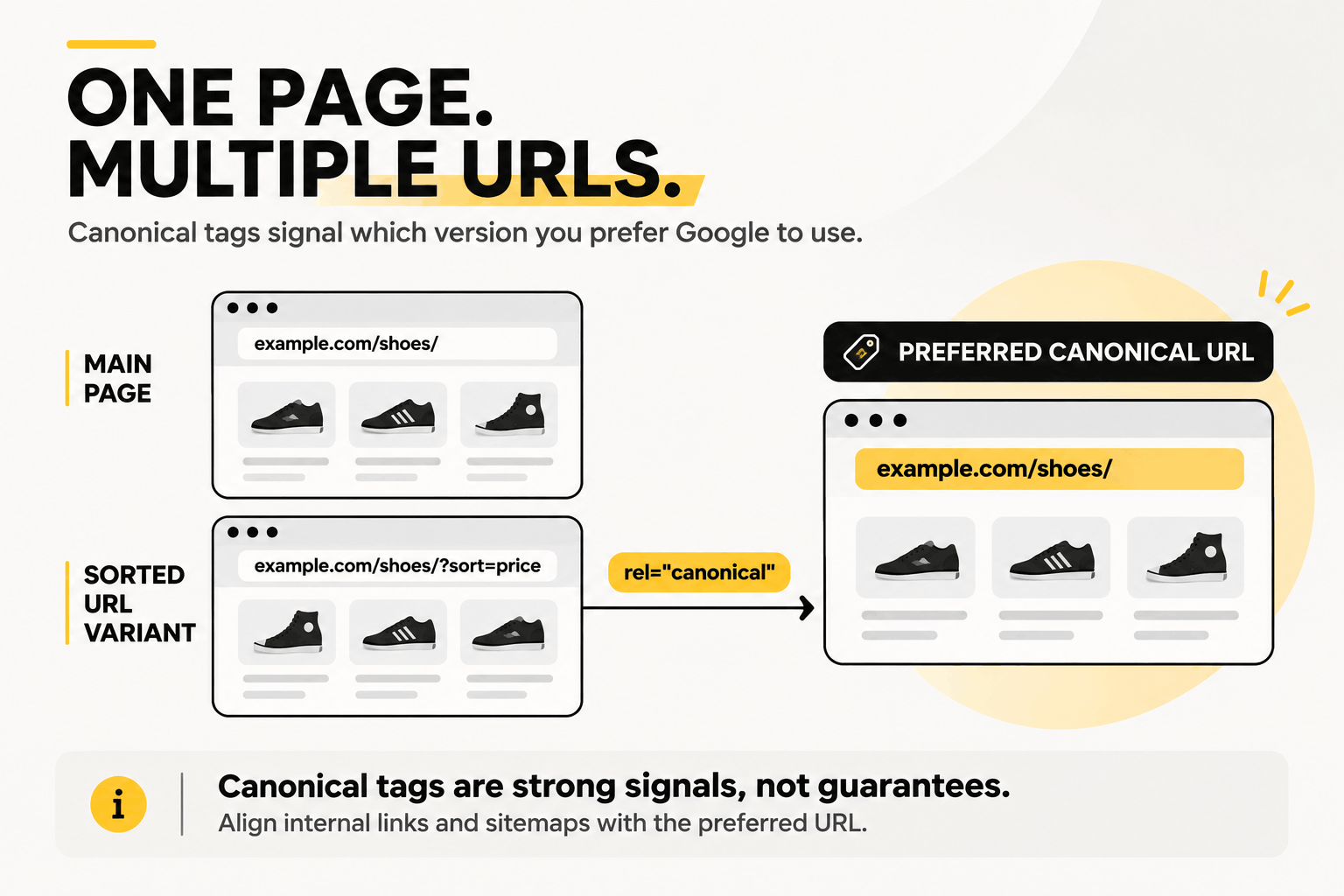
Duplicate URLs frequently arise in ecommerce when tracking parameters, filters, sorting options, and other URL variations create multiple URLs that show similar content.
For example:
example.com/shoes/
example.com/shoes/?sort=price
A rel="canonical" tag signals which URL you prefer Google to treat as the main version.
Use Screaming Frog or another site crawler to review canonical tags across your website. Then check Google’s selected canonical in URL Inspection.
Look for conflicts between:
- Canonical tags
- Internal links
- XML sitemap URLs
- Redirect destinations
For standalone indexable pages, self-referencing canonical tags are generally a useful convention.
Google treats canonical annotations as strong signals, not absolute instructions. It may select a different URL when other evidence suggests that version is more appropriate.
Google explains these situations in its canonicalization documentation.
5. Improve Site Architecture and Internal Linking
A clear site structure makes it easier for people and search engines to find useful pages.
For a service-based website, a simple hierarchy might look like this:
Homepage → Service Category → Individual Service Page
Run a crawl with Screaming Frog or Sitebulb and check for orphan pages, excessive crawl depth, and important URLs with very few internal links.
An orphan page has no discoverable internal links pointing to it. Even if it appears in your XML sitemap, it may be harder for visitors and crawlers to find through normal website navigation.
As a practical guideline, try to keep important pages within roughly three clicks of the homepage. This isn’t a Google requirement, and larger websites may need a deeper structure.
Add contextual internal links where they genuinely help readers move between related topics.
Use descriptive anchor text, keep navigation straightforward, and avoid burying your most useful content under unnecessary layers.
6. Review URL Structure and Redirects
Readable URLs make a website easier to understand and maintain.
For new pages, use short, descriptive paths such as:
example.com/services/technical-seo-audit/You don’t need to change existing URLs just because they’re long.
Unnecessary URL changes can introduce broken links, redirect problems, and temporary search visibility fluctuations.
Instead, look for issues that actually need attention:
- Redirect chains
- Redirect loops
- Broken internal links
- Incorrect redirect destinations
- Old URLs that should point to relevant replacements
When a page permanently moves, a 301 or 308 redirect is usually appropriate.
Update internal links to point directly to the final destination rather than relying on repeated redirects.
7. Secure Your Website with HTTPS
HTTPS encrypts the connection between a visitor’s browser and your website.
Check that your SSL/TLS certificate is valid and that important pages load securely.
Also look for mixed content, where an HTTPS page still requests images, scripts, or other resources over HTTP.
Your technical SEO review should cover:
- Valid SSL/TLS certificates
- Appropriate HTTP-to-HTTPS redirects
- HTTPS URLs in canonical tags
- Secure internal links
- Mixed-content warnings
HTTP Strict Transport Security (HSTS) can provide additional protection, but it needs careful configuration. Incorrect settings can make affected hostnames inaccessible.
HTTPS is a basic security practice and contributes to the overall page experience, but adopting HTTPS alone will not produce substantial ranking gains.
8. Check Mobile-First Indexing and Mobile Usability
Google uses the mobile version of a website’s content for indexing.
That means important information shouldn’t disappear when someone opens your site on a phone.
Test key pages using Chrome DevTools, Lighthouse, and Google Search Console’s URL Inspection tool.
Look for common mobile problems:
- Content missing from the mobile layout
- Difficult navigation
- Horizontal scrolling
- Images extending beyond the screen
- Important internal links missing on mobile
Your headings, primary content, metadata, and structured data should remain accessible.
Also check that mobile visitors can complete important actions, such as submitting forms or contacting your business.
Google retired its standalone Mobile-Friendly Test in December 2023. Use current browser testing tools and Search Console instead.
9. Optimize Page Speed and Core Web Vitals
A slow website can lose visitors before they even reach your content.
Google’s earlier mobile web research, referenced in Google AdSense Help and the Google Ads Blog, reported that 53% of mobile visits were likely to be abandoned when pages took longer than three seconds to load.
Speed affects how quickly people can see a page, interact with it, and complete an action.
Speed improvements can also affect conversions. The Google-commissioned Milliseconds Make Millions study by Deloitte and 55 examined 37 brand websites and more than 30 million user sessions. A 0.1-second improvement across four measured speed metrics was associated with an 8.4% increase in retail conversions and a 21.6% improvement in progression from the first form step to the form-submission page on lead-generation websites.
These were observed results under specific study conditions, not guaranteed outcomes for every website.
How to Improve Website Loading Speed
Start with Google PageSpeed Insights, GTmetrix, or Chrome DevTools Lighthouse. Find out what’s slowing the page down before making changes.
Common improvements include:
- Optimize images. Resize and compress large files. Consider WebP or AVIF if possible, and lazy-load images below the fold. Avoid lazy-loading the main image responsible for Largest Contentful Paint (LCP).
- Reduce unnecessary CSS and JavaScript. Remove unused code, reduce file sizes, and investigate render-blocking resources.
- Enable browser caching. Configure
Cache-Controlheaders so browsers can reuse static resources instead of downloading them repeatedly. - Enable text compression. Brotli or Gzip can reduce the amount of data transferred for HTML, CSS, and JavaScript.
- Improve server response time. Review your hosting, database queries, caching configuration, and CDN setup.
GTmetrix provides detailed performance reports and recommendations for image optimization, CSS/JavaScript minification, efficient cache policies, and render-blocking resources. See its official performance recommendations.
You don’t need to apply every optimization. Start with the bottlenecks identified by your performance testing tools.
Core Web Vitals to Monitor
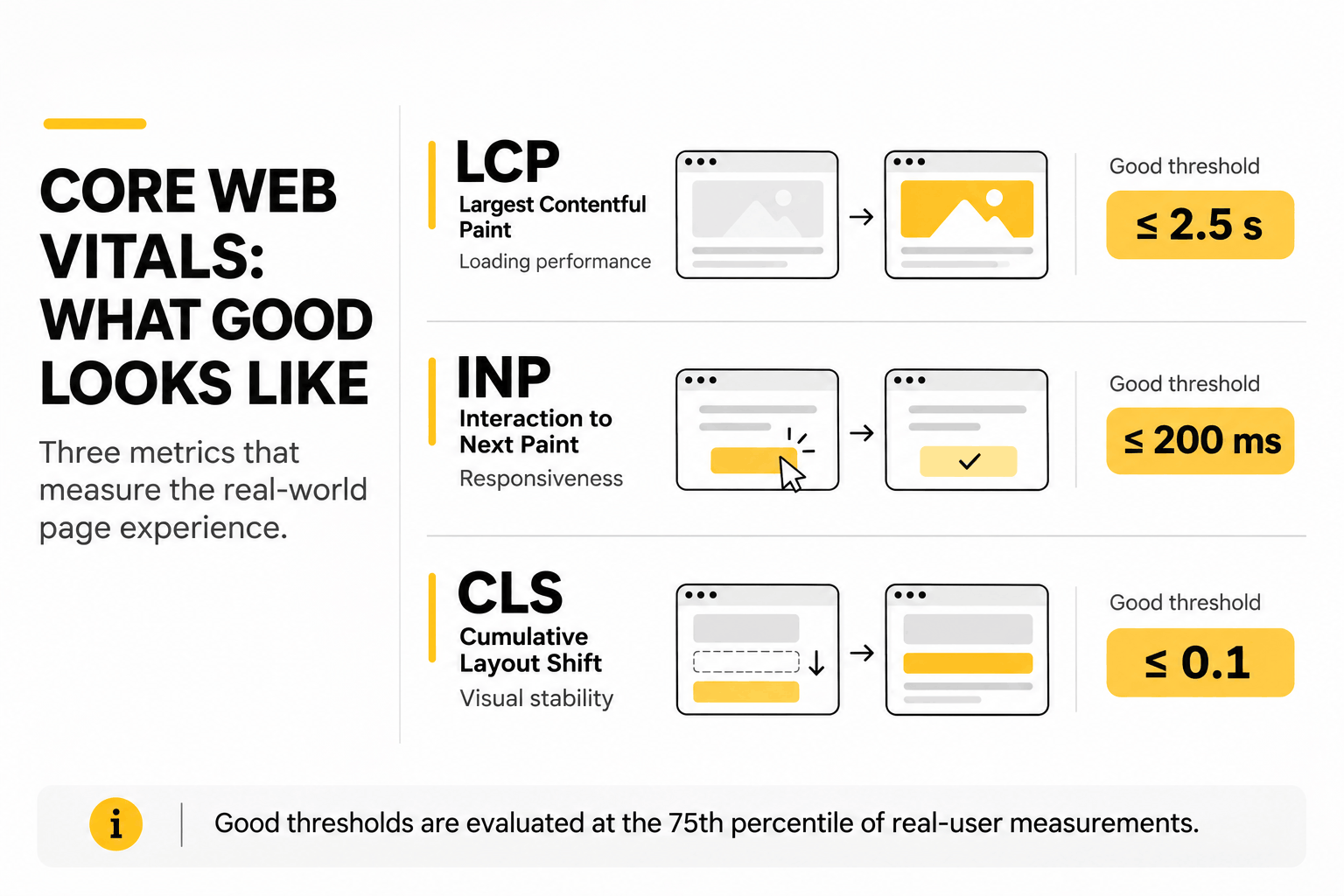
Google’s Core Web Vitals measure three aspects of the real-world user experience:
| Metric | Good Threshold | What It Measures |
|---|---|---|
| Largest Contentful Paint (LCP) | ≤ 2.5 seconds | Loading performance |
| Interaction to Next Paint (INP) | ≤ 200 milliseconds | Responsiveness |
| Cumulative Layout Shift (CLS) | ≤ 0.1 | Visual stability |
These thresholds are evaluated at the 75th percentile of real-user measurements. INP replaced First Input Delay (FID) as a Core Web Vital in March 2024.
For slow LCP, investigate server response times, render-blocking resources, and large above-the-fold images.
For poor INP, look at expensive JavaScript tasks and other work delaying interactions.
Unexpected CLS often comes from images, embeds, advertisements, or other elements loading without reserved space.
See Google’s Core Web Vitals guidance for the thresholds and how they’re evaluated.
10. Test JavaScript Rendering
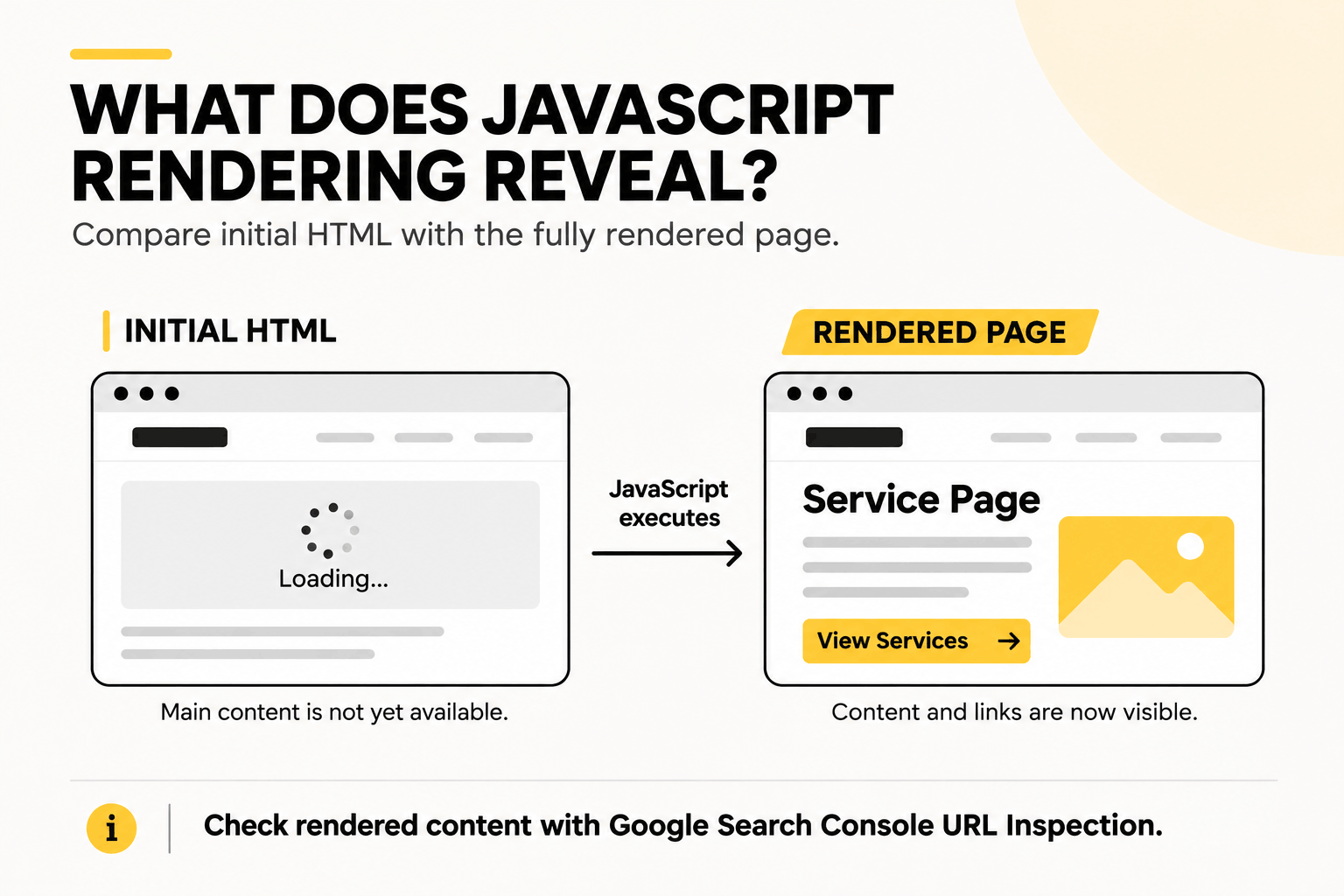
Websites built with React, Vue, Angular, or Next.js can run into indexing problems when important content depends on JavaScript that doesn’t execute properly.
Google can render JavaScript, but that creates another stage where things can go wrong.
A page might look complete in your browser while Google receives incomplete content or cannot discover certain internal links.
Use URL Inspection in Google Search Console or Screaming Frog’s JavaScript rendering mode to compare the initial HTML with the rendered page.
Check whether Google can access:
- Main page content
- Important internal links
- Title tags and metadata
- Canonical tags
- Other SEO-critical page elements
If client-side rendering is causing problems, consider server-side rendering (SSR), static site generation (SSG), or an appropriate hybrid approach.
The right solution depends on the framework and how the website delivers its content.
Google’s JavaScript SEO documentation explains the rendering considerations in more detail.
11. Validate Structured Data Markup
Structured data helps search engines interpret information about your pages.
Many websites use JSON-LD to implement Schema.org markup.
Common types include:
ArticleBreadcrumbListProductOrganizationLocalBusiness
Use Google’s Rich Results Test to check markup for supported Google Search features. For broader Schema.org validation, use the Schema Markup Validator.
Make sure your structured data accurately reflects the visible content and contains the properties required for the relevant feature.
For example, Article structured data can provide details about a blog post’s headline, author, and publication date.
Valid markup does not guarantee rich results. Google also discontinued FAQ rich results in May 2026, so adding FAQPage markup is not a strategy for obtaining FAQ enhancements.
For blog posts, Article structured data can provide information such as the headline, author, and publication date.
12. Review Pagination and Faceted Navigation
Pagination and filters are common on ecommerce websites, blogs, and large directories.
Each page in a paginated sequence needs a distinct, crawlable URL.
For example:
example.com/products/?page=2Connect these pages through standard HTML links so Googlebot can discover the content beyond page one.
Google no longer uses rel="next" and rel="prev" as pagination signals.
Each paginated page should generally have its own canonical URL rather than pointing everything back to the first page. Google covers these decisions in its pagination best practices.
Faceted navigation requires additional attention.
Filters for price, color, size, and sorting can generate large numbers of URL combinations. Some may be valuable landing pages, while others add little search value.
Decide which filtered pages should remain accessible and indexable. Then apply suitable crawling, indexing, or canonicalization controls to the remaining variations.
See Google’s faceted navigation guidance for recommended approaches.
13. Fix Broken Internal Links and 404 Errors
Broken internal links lead visitors and crawlers to pages that no longer exist.
Use Screaming Frog or another website crawler to find internal links pointing to 404, 410, or other error responses.
When you find a broken link, check whether a suitable replacement exists.
If it does, update the internal link. If the old page has permanently moved, consider redirecting it to the relevant replacement.
Don’t redirect every missing URL to the homepage.
Unrelated redirects can confuse visitors and may be treated as soft 404s by Google.
Also, not every 404 is a problem. A deliberately removed page with no suitable replacement can correctly return 404 or 410.
Prioritize broken links in navigation menus and important service, category, or product pages.
14. Check Hreflang for Multilingual Websites
This check applies to websites with multiple language or regional versions.
Hreflang helps Google identify equivalent pages intended for different languages or regions.
For example, a company might publish separate English-language pages for visitors in the UAE and the United States.
Those pages may use similar content while targeting different regional audiences.
Check your hreflang implementation for:
- Valid language and country codes
- Correct destination URLs
- Reciprocal annotations between equivalent pages
- Self-referencing hreflang entries
- Consistency with canonical URLs
You can also use x-default to identify a suitable fallback page when appropriate.
Not every international website needs hreflang. It becomes relevant when you have alternate language or regional versions of the same content.
Google’s international SEO documentation explains the supported implementation methods.
15. Review Server Logs and Crawl Budget When Needed
Crawl budget describes the URLs Googlebot can and wants to crawl on a website.
For very large or frequently updated websites, crawl efficiency can become a serious technical SEO concern.
Internal searches, filters, sorting options, and session parameters may generate thousands of URLs that offer little search value.
Repeated crawling of these URLs can consume server resources.
According to Prakasa, SEO Specialist at The Creatives 360, effective crawl budget optimization involves blocking low-priority paths, such as /wp-admin/ directories, internal search result URLs, non-essential backend scripts, and duplicate filter parameters through robots.txt. Front-end CSS and JavaScript files needed by Google’s Web Rendering Service (WRS) should remain accessible to avoid rendering problems.
In practice, review four areas:
- Administrative pages: Protect private areas with authentication and restrict unnecessary crawling where appropriate.
- Internal search results: Identify URL patterns that generate large numbers of low-value pages.
- Duplicate parameters: Manage unnecessary filter and sorting combinations without blocking useful landing pages.
- Scripts and resources: Keep the CSS and JavaScript files Google needs to render important content accessible.
Be careful with robots.txt restrictions.
Blocking a URL doesn’t guarantee that Google will remove it from the index. Reducing crawling of unwanted URLs also doesn’t guarantee Google will redirect that capacity toward your priority pages.
Use Google Search Console’s Crawl Stats report, server logs, or Screaming Frog Log File Analyser to investigate crawling patterns.
Google’s crawl budget guidance is primarily intended for large or frequently updated websites.
For smaller sites, keeping important pages accessible and maintaining accurate XML sitemaps is usually a better starting point.
Technical SEO Examples: Common Problems and Fixes
Finding a technical problem is only useful when you know what to do with it.
Here are a few common situations and how to verify the fix.
| Problem | Possible Fix | How to Verify |
|---|---|---|
| A page isn’t indexed because of an accidental noindex | Remove the unintended directive | Inspect the live URL and monitor indexing |
| Google selects the wrong canonical URL | Align canonical tags, sitemaps, and internal links | Compare declared and Google-selected canonicals |
| Mobile LCP is too slow | Optimize the main image and reduce loading delays | Check PageSpeed Insights and field data |
| Important content is missing after JavaScript rendering | Fix rendering or serve critical content in the initial HTML | Inspect the rendered HTML |
These are illustrative examples, not client case studies.
For each issue, document which URLs are affected, what needs to change, and how you’ll confirm the problem has been resolved.
How to Perform a Technical SEO Audit
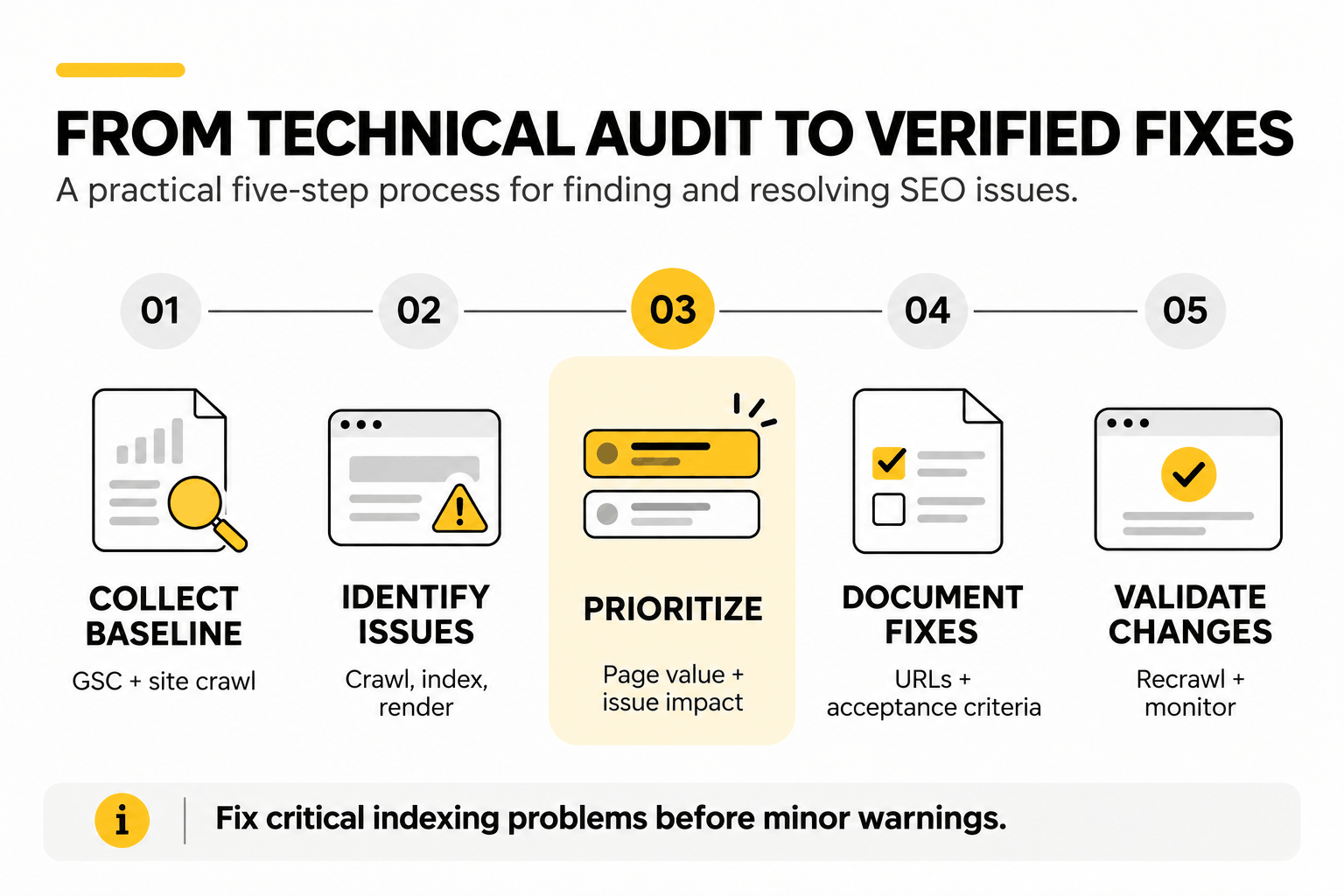
A technical SEO audit helps you understand what’s wrong with a website and which issues deserve attention first.
You can turn the checklist above into a working audit using five steps.
1. Collect your baseline. Start with Google Search Console and crawl the website using Screaming Frog or Sitebulb. Record current indexing status, technical errors, and important page performance.
2. Identify technical problems. Review crawl restrictions, indexing directives, canonical tags, redirects, JavaScript rendering, and site performance. Use PageSpeed Insights or GTmetrix where performance testing is needed.
3. Prioritize by impact. Consider which pages are affected, how serious the issue is, and whether it prevents users or search engines from accessing valuable content.
4. Document the fixes. Give developers the affected URLs, clear instructions, and acceptance criteria. A screenshot or example URL can help them reproduce the problem.
5. Validate the changes. Test the implementation, recrawl affected pages, and monitor the relevant reports in Google Search Console.
A long audit report isn’t necessarily a useful one.
An accidental noindex on a major service page deserves more attention than a minor broken link on an old blog post.
The goal is to identify problems your team can actually fix, in an order that makes sense for the website.
What Is a Technical SEO Specification?
A technical SEO specification is a document that explains a problem to developers, describes the required fix, and defines how to test it.
For example:
| Field | Example |
|---|---|
| Issue | Service pages contain unintended noindex directives |
| Affected URLs | Selected pages under /services/ |
| Priority | Critical |
| Required fix | Remove unintended robots meta tags or X-Robots-Tag headers |
| Acceptance criteria | URLs return HTTP 200 and allow indexing |
| QA | Check production headers and inspect live URLs in GSC |
This gives developers a clear task with a measurable outcome.
It’s much more useful than a vague request to “fix technical SEO.”
Technical SEO Metrics and Benchmarks
Once you’ve completed your technical SEO checklist, monitor whether the changes are working.
Start with metrics that show whether important pages are accessible, indexable, and performing as intended.
| Metric | Recommended Target | Reference |
|---|---|---|
| LCP | ≤ 2.5 seconds | Official Core Web Vitals threshold |
| INP | ≤ 200 milliseconds | Official Core Web Vitals threshold |
| CLS | ≤ 0.1 | Official Core Web Vitals threshold |
| TTFB | ≤ 800 milliseconds | General web.dev guidance |
| TTFB stretch target | Below 200 milliseconds | Aggressive practitioner target |
| Indexation of intended URLs | 90–95% | Illustrative internal target |
| Priority-page click depth | Within roughly 3 clicks | Practitioner guideline |
| Broken internal links | Aim for zero | Maintenance target |
Not every number in this table is a Google requirement.
The Core Web Vitals thresholds are official. The remaining operational targets should be interpreted according to your website.
For example, an indexation target should apply to pages intended to appear in Google, not every URL generated by the website. Filters, redirects, and duplicate variations may be excluded intentionally.
Similarly, a TTFB below 200 milliseconds is an aggressive engineering target, not a universal SEO requirement. web.dev’s TTFB guidance uses 800 milliseconds as a broader benchmark.
Track these metrics alongside organic clicks, impressions, keyword rankings, and conversions.
Some technical fixes can be validated immediately. Their effect on indexing and organic performance may take longer to appear.
Frequently Asked Questions
How Often Should You Run a Technical SEO Checklist?
A full technical SEO audit every three months is a reasonable starting point for many websites. Run additional checks after major redesigns, migrations, CMS updates, or server changes. Large sites with frequent changes may need closer monitoring.
Can Technical SEO Improve Google Rankings?
Yes. Fixing problems that prevent important pages from being crawled, indexed, or used effectively can improve search performance. However, rankings also depend on content relevance, competition, links, and other signals.
Can Technical SEO Fix Poor-Quality Content?
No. Technical SEO can make content accessible to search engines, but it won’t make irrelevant or unhelpful information more valuable. Content quality and search intent still need separate attention.
Does Technical SEO Matter for AI Search?
Yes. Google’s AI Overviews and AI Mode build on existing Search systems. Crawlability, indexability, and useful content therefore remain relevant.
Google doesn’t require special AI-only schema or formatting for these features. See its AI search guidance.
Which Tools Are Best for Technical SEO Audits?
Google Search Console helps identify crawling and indexing problems. Screaming Frog and Sitebulb are useful for checking URLs, internal links, redirects, and website structure.
For performance testing, use PageSpeed Insights, GTmetrix, Lighthouse, or WebPageTest. Google’s Rich Results Test and the Schema Markup Validator help validate structured data.
Which Tools Are Best for Technical SEO Audits?
Yes, technical SEO is critical for visibility in AI search features such as Google AI Overviews, ChatGPT Search, and Perplexity. AI retrieval systems rely on clean crawl access, fast server response times, server-side rendered HTML, and Schema.org structured data to parse page entities and extract factual passages without executing heavy client-side JavaScript.
How The Creatives 360 Can Help Your Search Engine Optimization
Technical SEO problems aren’t always visible when you browse a website. A page may look fine while Google encounters indexing restrictions, duplicate URL signals, or rendering problems.
At The Creatives 360, as an SEO agency in Dubai, our services include website audits, technical SEO, Core Web Vitals optimization, and ongoing search performance monitoring.
We help businesses identify technical problems, prioritize fixes, and improve how their websites are accessed by search engines.
Need a clearer picture of your website’s technical health? Contact The Creatives 360 to discuss a technical SEO assessment.